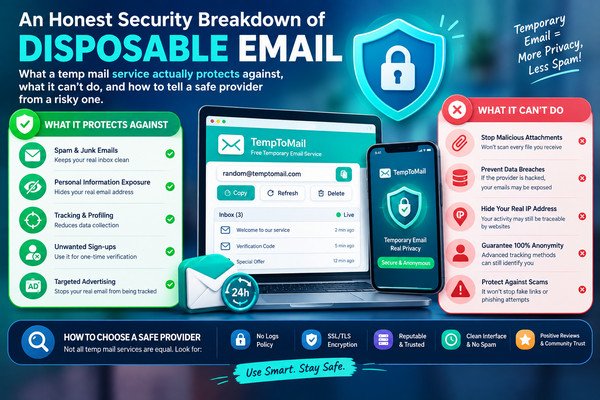
"Is Temp Mail Safe To Use?" is a fair question, and the honest answer is neither a flat yes nor a flat no — it depends heavily on what you mean by "safe," and even more on which provider you actually use. This article breaks the question into its real component parts: what a disposable email address genuinely protects you from, what it cannot protect you from no matter how carefully it's built, and how to tell whether a specific provider is implemented safely or is quietly cutting corners behind reassuring marketing language.
The short answer
The risk profile of "temp mail" as a category is often discussed as if every provider behaves identically. They don't. Two services can both call themselves "100% anonymous" while one sanitizes incoming HTML and generates unguessable addresses, and the other renders raw email content directly and uses predictable, sequential addresses that anyone can enumerate. The category name tells you almost nothing; the implementation tells you everything.
What temp mail actually protects against
- Long-term marketing exposure. A permanent address you hand to a one-off signup can end up on marketing lists for years. A disposable address that expires takes that exposure with it.
- Being tied to a data broker's profile. Data brokers stitch together information using email addresses as a key. An address that never existed after today can't be added to a profile that persists into next year.
- Some (not all) spam. If a site you signed up with sells or leaks your address, the resulting spam lands in a mailbox you've already abandoned rather than your daily inbox.
- Casual correlation across unrelated signups. Using a fresh disposable address per service means those services can't easily discover you have accounts on both of them just by comparing email addresses.
What it does not protect against
- Your IP address. Any site you visit, disposable email or not, can still see the IP address your connection comes from unless you're separately using a VPN or similar tool.
- Browser fingerprinting. Screen size, installed fonts, timezone, and dozens of other quiet signals can still identify your browser as "probably the same visitor" across sites, independent of what email address you typed in.
- Anything you type into the site itself. A disposable email does nothing to protect your name, shipping address, payment details, or any other field on the same signup form.
- Platform terms of service. Using a disposable address to re-register after a ban, or to repeatedly reset a free trial, is still a terms-of-service violation on the platform's side — the email being disposable doesn't change that.
- Legal identity. A disposable address is not a shield against legal process. If required by law, an email provider (disposable or not) can be compelled to hand over whatever logs it actually retains.
The real risks, ranked
Not all temp-mail risks are equally serious. Here's a rough ordering, from most to least concerning:
| Risk | Why it matters | How a well-built provider avoids it |
|---|---|---|
| Guessable addresses | Anyone who can predict an address can read mail sent to it — including OTP codes and password resets | Long, randomly generated local parts (not short counters or predictable patterns) |
| Unsanitized HTML rendering | A malicious email can contain scripts or trackers that execute in your browser | Server-side sanitization before any message content reaches the page |
| Open redirects in "click here" links | A compromised or malicious link handler can silently send you anywhere | Signed, provider-controlled redirect tokens rather than passing raw URLs through |
| Vague or missing retention policy | You can't evaluate a privacy claim that isn't specific | A stated, short retention period (hours, not "indefinitely" or unspecified) |
| No HTTPS, or mixed content | Traffic to and from the inbox could be intercepted or tampered with on the network | HTTPS enforced site-wide, no mixed HTTP resources |
How to evaluate a provider before trusting it
Most of these are things you actually can check from outside, without needing to see the provider's source code:
- Look at the address itself. If it's short, follows an obvious pattern, or looks sequential, treat the service as low-trust — that pattern usually means addresses (and their mail) are guessable.
- Check the URL bar. A padlock and
https://should be present throughout, not just on the homepage. - Read the privacy policy for a number, not a vibe. "We periodically clean up old data" is vague; "messages are deleted after 24 hours" is a claim you can actually hold the provider to.
- Notice how message content is displayed. If clicking a link inside a received email takes you somewhere unexpected or the browser flags a warning, that's a signal the provider isn't handling untrusted HTML carefully.
- Check for a real way to contact the operator. A working contact page is a small but meaningful signal that a real, accountable team is behind the service.
What TempToMail specifically does
We'd rather state this plainly than lean on marketing language like "100% anonymous" or "military-grade encryption," phrases that show up across the temp-mail industry but rarely describe anything specific enough to verify. If a security claim can't be checked, it isn't really a claim — it's decoration. When we update how the service works, we update the Privacy Policy to match, rather than leaving old marketing copy standing alongside a changed system.
FAQ
Can someone else read my temp mail inbox?
Only if they can guess or otherwise obtain the exact address, and the provider hasn't added any additional access control. This is exactly why address unpredictability matters as much as it does — it's often the only real barrier standing between your inbox and a stranger's.
Is it safe to click links inside an email received in a temp mail inbox?
Treat it the same as you would in any inbox: be cautious with unexpected links, especially ones asking for login credentials or payment details. A well-built provider reduces some risk by routing links through a safety check, but that isn't a substitute for basic caution.
Does using temp mail put me at more legal risk than a normal email account?
No — the underlying technology is legal to use in most jurisdictions. What creates risk is the same thing that creates risk with any email: what you use the account for. A disposable address doesn't add legal risk on its own, and it doesn't remove it either.
Is a browser-based temp mail service safer than a temp mail mobile app?
Not inherently — it depends on what permissions the app requests and what the provider does with the data either way. A browser-based service at least avoids requesting device-level permissions (contacts, storage, notifications) that a poorly-scoped app might ask for unnecessarily.
Can a temp mail provider see the contents of my messages?
Technically, yes — the provider's servers have to receive and parse each message in order to display it to you, so in that narrow sense a provider always has the same access an email server operator always has. What varies is what happens after that: a provider with a short, enforced retention window and no third-party analytics on message content is meaningfully different from one that logs everything indefinitely. This is exactly why the retention policy matters more than any "anonymous" marketing label.
What should I do if I suspect a temp mail provider is behaving unsafely?
Stop using it for anything you care about, and avoid entering it into any site that will send you sensitive information (password resets for real accounts, financial details, anything tied to your legal identity). Disposable mail should only ever carry low-stakes, throwaway signups in the first place, so the practical damage from a bad provider is naturally limited — but it is still worth switching to a provider with clearer, checkable practices going forward.
For the broader picture of how disposable email works and when it's the right tool, see our main guide to disposable temporary email. If you're evaluating it for automated testing rather than everyday browsing, our guide on disposable email for QA and CI pipelines covers that use case, and our piece on using temp mail with AI image and video tools covers the fair-use line for a specific popular use case.